Stock Screener, AI Scanner
AInvest Fintech, Inc.Finance
4.3582.00 Reviews
- Version
- 5.1.1.0
- Installs
- 1.00M
- Age Rating
- Everyone
Screenshots
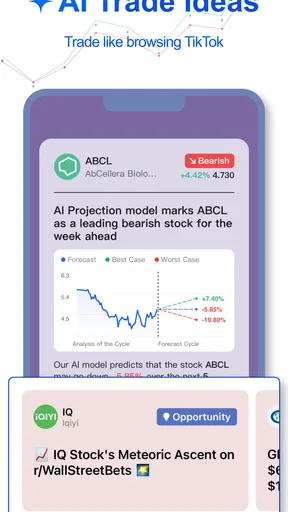
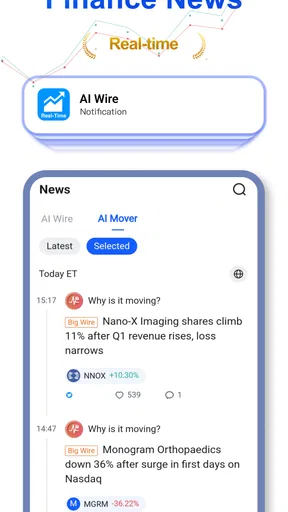
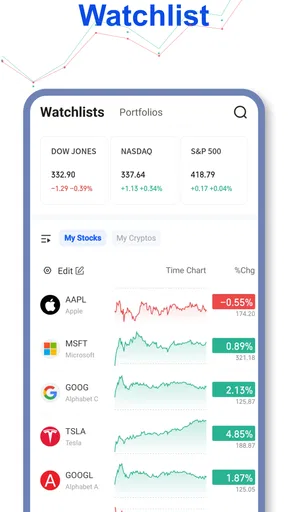
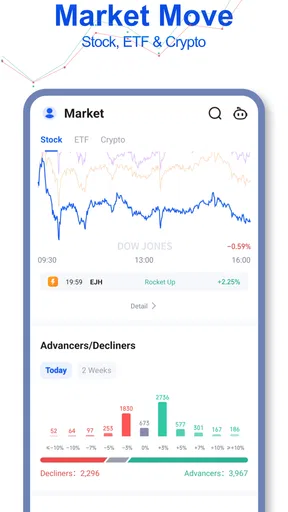
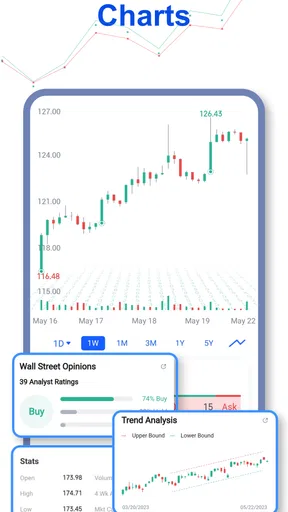
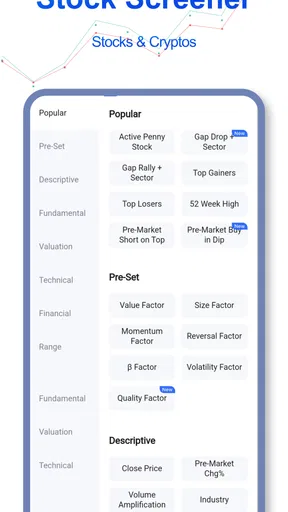
Our Review of Stock Screener, AI Scanner
 Analysis by Appyee
When I start looking for a stock, the hardest part is often not finding information but deciding what deserves my attention. A watchlist can grow into a jumble, while opening charts one by one turns a quick check into a long detour. That is the problem Stock Screener, AI Scanner is meant to help with: narrowing a broad market search into a set of candidates I can examine more carefully. I find it most useful as a research starting point, not as a shortcut to a buy decision.
A useful starting point, with a clear purpose
This finance app comes from AInvest Fintech, Inc. and is free to install, with in-app purchases ranging from $1.99 to $699.99 per item. Its audience is broad: the content rating is Everyone, and the app has reached over a million installs. It has a 4.3 average from around 3,900 ratings, which suggests plenty of people have tried it, though a rating alone cannot tell me whether its approach suits my investing habits.
The name points to the central idea: use screening and AI-assisted stock discovery to move from “What should I look at?” to “Which companies are worth researching?” I would open it when I have a theme in mind, such as comparing companies in a sector, or when my existing watchlist feels too narrow. If I already know exactly which company I want to study, a dedicated brokerage app or a focused company-research source may get me to the information I need with fewer steps.
First Impressions
When I first downloaded the Stock Screener, AI Scanner, I was struck by its clean and intuitive interface. No clutter, no unnecessary frills—just a straightforward layout that even a stock market newbie could appreciate. The developers have clearly put some thought into making the user experience as seamless as possible.
Right off the bat, you’re greeted with a dashboard that’s both aesthetically pleasing and functional. It’s like they knew exactly what you’d need at a glance and put it all right in front of you. The app’s AI-driven features promise to help you make informed decisions without drowning in data.
From a broad idea to a shortlist
My preferred way to use a screener is to decide on the question first, then choose filters that help answer it. For instance, I might be looking for companies in a particular area of the market rather than asking an open-ended AI prompt to name a winner. A narrower question makes the results easier to interpret and gives me a reason to inspect each candidate instead of treating a generated suggestion as a conclusion.
That distinction matters because screening is a sorting step. A company that appears in a result has met whatever criteria were applied; that does not automatically make it suitable for my finances, risk tolerance, or time horizon. I use the shortlist to decide what to read next, then check the chart and related news for context. The practical value is less about being handed an answer and more about reducing the number of companies I need to investigate.
Features That Stand Out
Let’s talk features. Because that’s what we’re here for, right? What sets this app apart from the dozens of others out there?
- AI-Powered Insights: The app leverages AI to analyze market trends and provide insights that you might not pick up on your own. It’s like having a virtual financial advisor in your pocket.
- Customizable Screeners: Whether you’re a veteran trader or just dipping your toes in, you can customize screeners to filter stocks based on criteria that matter to you. It’s flexible, and that’s something I appreciate.
- Real-Time Alerts: Never miss out on a crucial market movement with real-time alerts. This feature ensures you’re always in the know, which is especially handy in today’s volatile market.
These features aren’t just gimmicks; they’re tools designed to give you an edge in the stock market game. The AI insights, in particular, have helped me feel more confident in my trading decisions.
Making the results easier to judge
A helpful habit is to keep my criteria tied to a specific research question rather than piling on filters until only a handful of names remain. Over-filtering can create a false sense of precision: the remaining stocks may fit the screen, but that does not mean the screen captures everything important. I would rather begin with a manageable set of conditions, review what turns up, and then adjust one criterion at a time so I can see how it changes the candidates.
Charts and news are useful handoffs here, but they serve different purposes. A chart can help me notice how a stock has behaved over a selected period; news can explain why a company or sector is attracting attention. Neither one, on its own, settles whether a stock is worth owning. I treat both as prompts for further reading, especially when a sudden move makes an otherwise ordinary candidate look unusually compelling.
Getting Down to Business
Now, onto the nitty-gritty of using the app. The setup was a breeze. After a quick registration, I was ready to dive into the world of stocks with my trusty AI partner. Navigating through the app is smooth, and everything is where you’d expect it to be.
The screener tool is my personal favorite. It’s detailed enough for seasoned traders but simple enough for beginners. You can filter stocks by market cap, sector, performance, and more. And the AI recommendations? Spot on! It’s like the app knows your trading style after just a few uses.
A realistic routine, not a one-tap trade
Imagine checking the market during a lunch break because a company in your watchlist has made a noticeable move. I would use the app to see whether that change puts it on my radar, look at its chart, and scan the news before deciding whether it merits a deeper review after work. If the initial results suggest a broader sector trend, I could widen the search and compare other names rather than reacting to the first stock that appears.
That workflow is a better fit for a research companion than for someone who wants to place a trade immediately and move on. The useful outcome is a more organized set of questions: what changed, which companies are affected, and what would I need to learn before acting? Keeping that distinction in mind also makes alerts less distracting. I would use them to prompt a check-in, not as instructions to buy or sell.
Where it fits among other finance tools
Compared with a typical brokerage app, a stock screener puts more emphasis on discovery than on carrying out a transaction. A brokerage is the natural choice when I already know what I want to buy or sell and need to manage an account; this app is more relevant when I am still sorting through possibilities. Compared with a general financial-news app, the screening workflow can make it easier to move from a market idea to a list of stocks to investigate, while a news-first service may be better when the main task is following a story as it develops.
I would not expect either comparison to make this a complete replacement for the tools I already use. A sensible handoff is to use the screener to form a shortlist, then verify important details with company materials and other research before making a decision. If a person mainly wants a portfolio tracker, a place to execute trades, or detailed fundamental analysis in one established workflow, a dedicated tool for that job may be more comfortable.
Who is likely to get the most from it
I can see the appeal for curious beginners who want a guided way to explore stocks, as well as for more experienced investors who like to scan a market before doing their own analysis. It is especially practical for someone who has a question but not a ticker in mind, or who wants to turn a loose theme into a smaller research list. The free starting point also makes it easier to try the workflow before deciding whether any paid options are worthwhile.
On the other hand, I would steer away from relying on it as a personal financial adviser or as a guarantee that an AI suggestion will perform well. Someone who dislikes alerts, prefers a tightly controlled manual research process, or already has a screener that matches their criteria may not gain much by adding another app. The strongest fit is a person willing to treat automated results as leads and do the judgment work themselves.
Why It’s Worth Your Time
If you’re serious about stock trading, the Stock Screener, AI Scanner is worth considering. It cuts through the noise and presents you with actionable data. The ability to customize alerts and screeners means you’re always a step ahead.
Another thing I love is the community aspect. The app connects you with other traders, allowing you to share insights and strategies. It’s a feature that fosters learning and growth, which is invaluable.
Practical trade-offs before relying on it
The first trade-off is that more discovery can mean more noise. An AI-assisted result may look persuasive because it is presented neatly, but I still need to understand what the underlying idea is and whether it matches my own plan. I would avoid building a portfolio around a list of suggested stocks without checking the reasoning, the company’s context, and the risks that matter to me.
The second is attention. Alerts can help me notice a development, but frequent checking can also pull me into short-term moves that do not fit a long-term approach. I would keep notifications focused on the watchlist or research questions I actually care about, and review them at a time I choose rather than letting every prompt dictate the day. That small boundary makes a market tool easier to use without turning it into a constant source of urgency.
There is also a subscription decision to make. The app is free to install, while individual in-app purchases range from $1.99 to $699.99. I would first establish whether the basic screening workflow genuinely saves me time, then judge any paid option by the specific value it adds to my routine. A high-priced purchase is not automatically necessary for someone who only checks a few stocks occasionally, and the presence of paid items does not mean every useful research step has to happen inside one app.
Questions I would settle through use
Can a beginner make sense of it? The approachable layout and screening concept make it a reasonable place to start exploring, but beginners still need to learn what each filter means and why a result appears. I would begin with one simple question and a small number of criteria, then look up unfamiliar terms rather than changing several settings at once.
Does the AI make the decision for me? I would not use it that way. AI-assisted insights can help surface ideas, but they are a starting signal, not a substitute for checking a company and deciding whether the investment fits my circumstances. Is it useful if I already have a broker? Yes, if I want a separate discovery and research step; it does not need to replace the app I use to manage investments.
What should I do when a result looks exciting? Pause, inspect the chart and news, and then verify the key facts through further research before acting. That is particularly important when a stock has moved sharply or the idea depends on a fast-changing story. This slower handoff is not a weakness of screening so much as a reminder of what screening can and cannot do.
Final Thoughts
All in all, the Stock Screener, AI Scanner app is a solid choice for anyone looking to enhance their stock trading toolkit. It’s user-friendly, packed with powerful features, and backed by AI that makes a real difference.
So, if you’ve been on the fence about which stock app to try next, give this one a shot. It just might be the game-changer you’ve been looking for. Happy trading!
For device context, its current version is 5.0.2.1 and it requires Android 8.0 or later. The app was released on April 30, 2020, and its Everyone age rating gives it a broad audience. I would still make the decision based on the workflow rather than the label: if I want a way to explore stocks, compare candidates, and follow up with my own research, it has a clear role. If I need a guaranteed recommendation or a complete substitute for careful investing, I would look elsewhere.
Verdict
Strengths of Stock Screener, AI Scanner
- AI-driven insights enhance decision-making.
- Customizable alerts for market changes.
- User-friendly interface for easy navigation.
- Real-time data updates ensure accuracy.
- Comprehensive stock analysis tools.
Limitations of Stock Screener, AI Scanner
- Limited features in the free version.
- Requires a stable internet connection.
- Occasional lag during peak hours.
- Some functions need a learning curve.
- Frequent ads in the free tier.
Other Releases by AInvest Fintech, Inc.
View All
AInvest: AI Stocks & Investing
Finance4.5
Similar Picks in This Category
View All
Google Wallet
Google LLC4.3

Airtel: Recharge, Bank & Loans
Airtel4.0

PayPal - Pay, Send, Save
PayPal Mobile4.2

DANA Indonesia Digital Wallet
PT Espay Debit Indonesia Koe4.5

Binance: Buy Bitcoin & Crypto
Binance Inc.4.8

Cash App
Block, Inc.4.7
Frequently Asked Questions
What is Stock Screener, AI Scanner, and how does it work?
Stock Screener, AI Scanner is an app designed for investors and traders to efficiently analyze stock market trends using artificial intelligence. The app provides real-time data, personalized alerts, and predictive analytics to help users make informed decisions. It simplifies complex data into easy-to-understand insights, making it accessible for both novice and experienced investors.
Is Stock Screener, AI Scanner suitable for beginners?
Yes, Stock Screener, AI Scanner is designed to be user-friendly and accessible for beginners. It features intuitive navigation, detailed tutorials, and a comprehensive help section to guide new users through the app. Additionally, it offers customizable settings and AI-driven suggestions to help beginners understand market movements and make informed trading decisions.
Does Stock Screener, AI Scanner offer real-time updates and alerts?
Absolutely, the app provides real-time updates and alerts on stock market changes. Users can customize notifications based on their portfolio or specific stocks of interest. These timely alerts ensure users never miss critical market movements, allowing them to react promptly to maximize investment opportunities or mitigate potential losses.
What are the system requirements for installing Stock Screener, AI Scanner?
To install Stock Screener, AI Scanner, you need a smartphone running at least Android 8.0 or iOS 11.0. The app requires a stable internet connection to access real-time data and a minimum of 200 MB of free storage space. Ensure your device meets these requirements for optimal performance and user experience.
Are there any subscription fees for using Stock Screener, AI Scanner?
Stock Screener, AI Scanner offers a free version with basic features, while premium features are available through a subscription. The premium plan includes advanced analytics, ad-free experience, and priority customer support. Users can choose a monthly or yearly subscription, with a free trial available to explore premium features before committing.
